CNET Editors' review
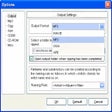
We were pleasantly surprised by Audiolib CD Ripper, a nice little application that helps you rip audio tracks from a CD into various audio format files. The installation flies by and the program launches on your desktop in seconds. The welcoming interface is easy to navigate. The program lets you select all the tracks or just the ones you want, then rip them into MP3, WAV, or OGG formats. The software also automatically detects your CD, reading information directly from it without connecting to any online music database. The ripping is widely configurable, allowing you to change bit rate, quality, and variable bit rate (VBR). The whole ripping process takes only seconds, and after it ends you can open the default output folder right from the program. Apart from ripping audio files, the software also can play with the functionality of a basic CD player. Considering its great output, Audiolib CD Ripper will appeal to audio enthusiasts.Publisher's Description
From Audiolib:
Audiolib CD Ripper is an easy-to-use tool that can rip audio CD tracks to MP3, WAV, or OGG format without creating temporary files. CDDB is supported, and you can connect to the FreeDB server to get CD information. Local CDDB also is supported, as are ID3 tags. The track title can be renamed, a Winamp playlist can be generated, and the program has cool skins.
More Products to Consider
- Burn the files and images on CD and DVD discs.Download
Installed
Smart Install - Create, edit, burn, mount, and encrypt CD, DVD, and BD image fi...Download
Installed
Smart Install - Mix, scratch, and remix MP3 or music videos live.Download
Installed
Smart Install - Convert CDs to MP3, WMA, WAV, OGG, FLAC formats, convert audio ...Download
Installed
Smart Install - Convert DVD movies to all the popular video or audio formats wi...Download
Installed
Smart Install - Get fast and flexible digital-media playback with access to sma...Download
Installed
Smart Install - Cut desired parts from your MP3 files.Download
Installed
Smart Install - Rip CDs, convert audio files, and burn discs easily.Download
Installed
Smart Install - Play video and audio files, convert to other file formats, burn...Download
Installed
Smart Install - Play your favorite audio and video files on PC.Download
Installed
Smart Install - Convert between CUE sheet format files.Download
Installed
Smart Install - Set up a virtual sound card that lets you broadcast/record/conn...Download
Installed
Smart Install - Search for and find required audio files.Download
Installed
Smart Install - Convert M4A/AAC into MP3/WAV format.Download
Installed
Smart Install - Read text aloud and save the spoken speech as mp3 and wav audio...Download
Installed
Smart Install - Convert and backup DVDs to AVI, DivX, iPod, iPhone, iPad, WMV, ...Download
Installed
Smart Install - Enrich your VSTi library with an additive synthesizer.Download
Installed
Smart Install - Create all sorts of CDs, DVDs, and Blu-ray discs.Download
Installed
Smart Install - Get the MP3 player that rips, converts, and records.Download
Installed
Smart Install - Play music using skinnable software audio player.Download
Installed
Smart Install - Copy DVD to iPod, iPhone, 3GP, PSP, Zune, HD TV, AVI, Divx, Xvi...Download
Installed
Smart Install - Convert audio files from one format to another and rip your aud...Download
Installed
Smart Install - Share and backup the media content for all iProducts.Download
Installed
Smart Install - Convert tracks from your regular audio CDs into MP3 music files...Download
Installed
Smart Install
-
All versions:
3.0 starsout of 2 votes
-
Current version:
3.5 starsout of 2 votes
-
My rating:
Write review
Results 1-2 of 2
-
"only 5 song sample"
Version: Audiolib CD Ripper 1.0
Pros
nice layout, user friendly
Cons
only rips 5 tracks before requesting a credit card to finish
-
"Easy to use, straighforward"
Version: Audiolib CD Ripper 1.0
Summary
Required no instructions, just look around your options and get to it.