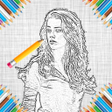
Used Sketch Art Pencil Sketch Maker Photo Editor for Android?
Editors’ Review
Sketch Art Pencil Sketch Maker Photo Editor, by Stylish Photo Apps, converts photographs into hand-drawn style images quickly. The app applies selectable artistic filters to camera or gallery images, provides live previews, and offers basic editing controls to refine tone, contrast, and composition before saving. It includes several stylized modes and texture options on mobile devices plus quick export utilities. Casual creators and social-media users who want rapid artistic results for posts and personal projects form the primary audience.
Top Recommended Alternative
The app exposes a palette of transform styles beyond simple graphite lines, including explicit pencil sketch, color sketch, oil painting and crayon-like textures. It also contains named modes such as a two-dimensional versus three-dimensional treatment and a distinctive "Pencil vs Camera" effect, which change how the image blends texture and photographic detail to create a hand-drawn look.
Which artistic styles and special effects does the tool actually produce?
What platform support and developer background back the experience?
The app is available on Android devices and typically requires Android 7.0 or higher, so it targets recent mobile hardware. Stylish Photo Apps develops a suite of photography and editing titles for Android, which situates this tool inside a mobile-focused portfolio. That background explains the emphasis on mobile workflows and on-device processing rather than desktop integration.
How does sharing and accessibility work on-device?
Sharing is built into the workflow: the tool offers quick export and direct posting paths to common networks and messaging services, with explicit compatibility for platforms such as Facebook and WhatsApp. The application is distributed under an open tier and is supported by advertisements, a fact noted in usage documentation and FAQs that affects uninterrupted editing sessions for some users.
How do users and reviewers describe its practical strengths and limits?
User commentary and product notes describe the tool as simple to operate and effective at producing stylized images quickly, which suits fast-turnaround social content. Although the app emphasizes visual transformation speed and filter variety, it does not position itself as a pixel-level compositor or multi-layer professional editor, a trade-off visible in its streamlined, filter-driven approach.
Pros
- Includes pencil, color, oil painting, and crayon-style artistic filters
- Distinctive special modes such as a 3D-style and "Pencil vs Camera" effect
- Quick export and direct sharing to social networks and messaging apps
- Runs on Android devices, typically requiring Android 7.0 or higher
Cons
- Ad-supported open tier can interrupt uninterrupted editing flow
- Not designed for advanced, multi-layer professional compositing
- No desktop or cross-platform edition; mobile-only availability
Bottom Line
A practical choice for quick stylistic conversions, not for precision image production
The app is a practical option for casual creators who need fast photo-to-sketch conversion and ready-to-share artwork. Although its filter-driven workflow and mobile focus enable rapid creative experiments, the tool stops short of advanced, professional editing depth; users seeking meticulous layer control or high-end compositing should look elsewhere. It serves best as a rapid visual lab for social-ready images.
Used Sketch Art Pencil Sketch Maker Photo Editor for Android?
Explore More

Sponsored
Adobe Stock
Trial version
Video Editor: Square Video
Free
Vids - Reels Video Editor
Free
Pakistan Army Photo Suit Editor 2019
Free
Midjourney -Ai Video Generator
Free
ImageCropper
Free
GBracket
Paid
Face Swapper AI Photo Editor
Free
DLSR Camera Helper
Free
PhotoEffect - AI Editor
Free
Magnifying and Microscope HD Zoom Camera
Free
Memoria Photo Gallery
Free











