Used POCO Launcher for Android?
POCO Launcher Analysis
AI Assisted Content ·
Not written by CNET Staff.
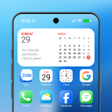
POCO Launcher is a free Android launcher developed by Xiaomi, designed to provide a cleaner and more organized Android experience. This launcher is the same one used in Xiaomi's POCO smartphone lineup, featuring a minimalist interface that emphasizes simplicity and ease of use. Users can customize their device with various themes, icon packs, and personalization options, while also benefiting from efficient app organization tools such as an alphabetical scroll bar and an app-hiding feature for privacy. Notification badges enhance the user experience by keeping track of unread notifications clearly.
Top Recommended Alternative
The design philosophy of POCO Launcher is characterized by a flat and uncluttered aesthetic, moving away from complex animations. While it delivers a generally smooth performance with fast app launches, users may encounter occasional stutters during app transitions. The customization options are more limited compared to other launchers like Nova Launcher or Lawnchair Launcher, which may not satisfy users looking for advanced features. Overall, POCO Launcher is an appealing choice for those seeking a straightforward, minimalistic interface.
Used POCO Launcher for Android?
Explore More
NEON - Z Next Launcher 3D Theme
Paid
Kawaii Zipper Lock Screen
Free
Rasta Weed Skull Keyboard Theme
Free
Spain Icon Pack - 2018 World Cup Theme
Paid
Gold Weed Skull Keyboard Theme
Free
Tamanna Bhatia Wallpaper HD
Free
Amigurumi 3D Wallpaper
Free
Foxy Queen Slots
Free
Awesome Dragon B Saiyanz Live Wallpapers 2020 4K
Free
3D Cross Live Wallpaper
Free
OnePlus 8 Theme for Computer Launcher
Free
Pink Diamond Bow Keyboard
Free