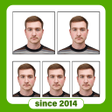
Used Passport Photo Maker - VISA/Passport Photo Editor for Android?
Passport Photo Maker - VISA/Passport Photo Editor Analysis
AI Assisted Content ·
Not written by CNET Staff.
Passport Photo Maker - VISA/Passport Photo Editor is a free Android application designed for users who need to create and edit passport and visa photos. The app offers a variety of editing tools and features, allowing users to adjust their images to meet official requirements, such as size and background color. Its user-friendly interface makes it accessible for anyone, regardless of their photography skills. Additionally, the app includes options to apply photo effects, adjust brightness and contrast, and crop images effectively.
Top Recommended Alternative
This application is particularly useful for individuals who frequently travel or need formal identification photos. It allows users to save time and money by providing a convenient way to produce compliant passport photos without the need for professional services. With its extensive editing features and variety of options, Passport Photo Maker - VISA/Passport Photo Editor stands out as a practical tool for personal and professional use.
Used Passport Photo Maker - VISA/Passport Photo Editor for Android?
Explore More

Sponsored
Adobe Stock
Trial version
Call Recorder - Automatic Call Recorder - callX
Free
Application Manager
Free
The Magic of Geomancy
Paid
Rough Diamond Estimate
Free
Xerox Print Service Plugin
Free
Plugin:LAVA v1.0
Free
CNIC Reader
Free
DroidEdit Pro (code editor)
Paid
Hindi Keyboard
Free
Flashlight for LG phones
Free
SurveyHeart - Online Survey, Questionnaire & Poll
Free