Used iOS Widgets for KWGT for Android?
Editors’ Review
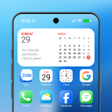
iOS Widgets for KWGT by VexCode brings iOS-style home screen widgets to Android, acting as a KWGT skin pack that reproduces iOS 14+ widget designs. The pack supplies weather, music, calendar, battery, fitness, news, photo slideshow, and system info widgets with dynamic updates and light/dark variants. It targets Android customization enthusiasts who install KWGT and the KWGT Pro Key and who are comfortable adjusting widget globals and scaling.
Top Recommended Alternative
The pack supplies a collection of precise iOS-style widgets that replace static shortcuts with functional replicas, including weather with dynamic updates, music tiles with playback controls and album art, calendar agendas, and system monitors for battery, RAM, and storage. Interactive elements let users control media and refresh news feeds from the widget, while light and dark variants change automatically based on system theme.
What the pack adds to your home screen
How deep customization goes inside KWGT
Customization takes place in the KWGT editor: the pack exposes variables in the 'Globals' area so colors, fonts, and scale can be adjusted per preset. Per-widget scaling and color overrides let the same design fit different grid sizes, and users can edit or remix presets to add or remove modules such as fitness tiles or RSS lists without leaving the editor.
Is setup suitable for non-technical users?
The pack requires KWGT Kustom Widget Maker and the KWGT Pro Key, so it is not standalone. Applying a widget follows the standard KWGT routine: long-press the home screen, open Widgets, choose a KWGT slot, tap the empty container, and select the pack. That workflow suits users already comfortable with widget editors rather than newcomers seeking plug-and-play widgets.
Does the pack affect device resources or compatibility?
The pack targets devices running Android 5.0 and up, and actual behavior depends on KWGT and device hardware. Widgets that use dynamic updates, photo slideshows, or live news feeds perform background work, so active complex widgets can increase CPU or battery use compared with simple static widgets. The developer focuses on the Kustom ecosystem, so compatibility follows updates to KWGT and system APIs.
Pros
- High-fidelity iOS widget replicas with dynamic updates
- Exposes Globals for color, font, and scale adjustments
- Interactive music and news controls directly on widgets
- Supports light and dark variants that switch automatically
Cons
- Requires KWGT Kustom Widget Maker and the KWGT Pro Key
- Applying widgets follows multiple manual KWGT workflow steps
- Animated slideshows and frequent updates can increase battery use
Bottom Line
A practical option for tinkerers, less convenient for casual users
iOS Widgets for KWGT is a focused choice for Android users who enjoy building and editing home screen presets inside an editor, because it depends on KWGT and exposes editable globals. Those seeking immediate, standalone widgets may find the setup extra work, and users sensitive to battery should prefer static presets over animated slideshows or frequently updating feeds. It rewards patience with a coherent, editable iOS-style appearance.
Used iOS Widgets for KWGT for Android?
Explore More

NewThing Widgets Pro
Paid
Hyper MIUI Global Themes
Free
Rummy Nabob
Free
Star Status Bar: Custom Icons
Free
One UI - icon pack
Free
Lightroom Preset DNG Files
Free
Hex Installer - Themes for OneUI (Early Access)
Paid
IOS 16 icon-pack and Theme
Free![Icon of program: [UX9] One UI 2 LG Android…](https://images.dwncdn.net/images/t_app-icon-s/p/827e505a-9e5c-4aeb-b51a-8c03d0794baa/2963732576/2072_4-78690504-icon.png)
[UX9] One UI 2 LG Android 10 - G8 V50 V60 Velvet
Paid
Touch Protector (to prevent unintended operations)
Free
Watch Face CUE Indus
Free
Yomo Launcher
Free