Used Design the next Smartphone for Android?
Editors’ Review
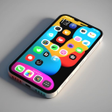
Place camera modules, swap materials, and paint every surface on a virtual device, then save snapshots to a gallery for later comparison. Developed by WetGrass for Android devices and tablets, the app emphasizes exterior, artistic smartphone design rather than manufacturing or business management. It offers a broad color palette, multiple camera layouts, and body materials for rapid mockups. Creative hobbyists and tech fans who want short, handheld design sessions will find the workflow approachable.
What kind of simulation the app delivers
So, you enter a visual sandbox that privileges style over spreadsheets: the experience centers on shaping exterior forms and surface treatments instead of running a company. Choices you make change the device's look and presentation, not an engineering model or supply chain. Thus, the app reads like a sketchbook for industrial design, where the core loop is pick, tweak, and preview rather than optimize production parameters.
How the controls and platform shape sessions
The interface is designed for quick creative 'phone maker' sessions and runs on devices with Android 7.1 or higher, supporting both phones and tablets. Core design tools are available offline, and a built-in gallery stores and displays saved creations for comparison. Touch-driven controls keep edits fast, so most sessions stay short and handheld instead of sprawling into long desktop workflows.
What keeps players returning and how it's received
Replay value comes from trying new color and camera combinations and building a visual portfolio inside the gallery. The app is presented as a lightweight, arcade-style simulation suited to quick bursts of creativity, and it holds an approximate 3.9-star rating on the Play Store. Players describe it as a fun, relaxing way to mock up ideas, which supports repeat use for casual concepting.
Pros
- Focuses on external industrial design rather than business simulation
- Wide color palette and material choices for visual experimentation
- Multiple camera module layouts to vary device silhouettes
- Gallery lets you view and save device mockups locally
Cons
- Official brand logos are not included in the base version
- Limited naming and branding tools requested by long-term players
- Designed for aesthetic mockups, not engineering or manufacturing detail
Bottom Line
The app suits quick concept artists but has limits for longer projects
The app is a compact mobile sketchbook for players who prioritize swift visual experimentation over technical depth. It contains advertisements to support development, and long-term players have asked for deeper naming and branding tools to turn mockups into more fleshed-out concepts. For casual designers and tech-curious creators, the app delivers focused visual play; users seeking expanded branding workflows should note those gaps.
Used Design the next Smartphone for Android?