Used Current Time Designator for Windows?

Editors’ Review

Download.com staff
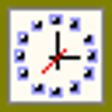
This application provides a straightforward display of the current date and time, including day, month, year, and weekday. It also shows application execution time, usable as a stopwatch.
Enlarged image for Current Time Designator
Current Time Designator 0/1
  • Pros

    • Displays current day, month, year, and weekday.
    • Shows current hour, minute, and second.
    • Tracks application execution time.
    • Execution time can function as a stopwatch.
  • Cons

    No Cons available


Used Current Time Designator for Windows?


Explore More


Full Specifications

GENERAL
Release
Latest update
Version
1.3
OPERATING SYSTEMS
Platform
Windows
Operating System
  • Windows 7
  • Windows 2003
  • Windows Vista
  • Windows XP
  • Windows 2000
  • Windows 10
Additional Requirements
None
POPULARITY
Total Downloads
146
Downloads Last Week
0

Report Software

Last Updated


Developer’s Description

Find current time, day, month, year, and week day.
With Current Time Designator you can know all, about current time! Day, month, year, Week day, clock (hours, minutes and seconds), time of execution of application .If you want you can use "time of execution of application" like a Stopwatch.

Download.com
Your review for Current Time Designator