Used Color Schemes for Windows?


Editors’ Review

Download.com staff
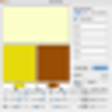
Color Schemes allows users to generate up to 28 distinct color schemes. Select colors manually or let the automatic mode suggest options.
Enlarged image for Color Schemes
Color Schemes 0/1
  • Pros

    • Supports up to 28 color schemes
    • Manual and automatic color selection modes
    • Uses 120 degree color wheel separation
    • RGB and hex value input supported
    • Drag and drop color functionality
  • Cons

    • Maximum three colors per scheme

Used Color Schemes for Windows?


Explore More


Full Specifications

GENERAL
Release
Latest update
Version
5.0.4
OPERATING SYSTEMS
Platform
Windows
Operating System
  • Windows 7
  • Windows 10
  • Windows 8
Additional Requirements
None
POPULARITY
Total Downloads
4,308
Downloads Last Week
2

Report Software

Program available in other languages


Last Updated


Developer’s Description

Put together up to 28 color schemes, each with up to three colors.
Color Schemes lets you put together up to 28 color schemes, each with up to three colors. There are two modes. In "Manual" mode you select all three colors; in "Automatic" mode, you select one color and two colors are generated for you using 120 degree color wheel separation. Red, Green, and Blue components of each color are selected using sliders, typing in decimal or hex values or using the Color Picker. You can drag and drop (Control key held down) color from any window to any other window. Color data is saved between sessions.

Download.com
Your review for Color Schemes