Used Clock - The Vault : Secret Photo Video Locker for Android?


Clock - The Vault : Secret Photo Video Locker Analysis

AI Assisted Content ·

Not written by CNET Staff.

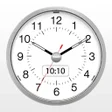
Clock Vault - Hide Photos, Videos is a utility application designed for Android users seeking to protect their private media. This innovative app disguises itself as a simple clock widget, allowing users to store sensitive photos and videos securely. It provides password protection and fingerprint biometrics for added security, ensuring that unauthorized individuals cannot access the stored content. Users can easily organize their media within folders and utilize dummy vaults to mislead potential intruders, making it a unique solution in the gallery vault category.

In addition to its primary functions, Clock Vault includes a built-in media player for viewing content directly from the app. The private browser feature offers a basic web browsing experience, although it may lack extensive options. However, some users have reported difficulties in accessing their vaults despite entering the correct passwords, indicating a critical area for improvement. Overall, Clock Vault presents a user-friendly interface, customization options, and distinct features to enhance privacy.

Enlarged image for Clock - The Vault : Secre…
Clock - The Vault : Secret Photo Video Locker 0/4

Used Clock - The Vault : Secret Photo Video Locker for Android?


Explore More


Full Specifications

GENERAL
Release
Latest update
Version
77.0
OPERATING SYSTEMS
Platform
Android
Operating System
Android 15.0
POPULARITY
Total Downloads
94
Downloads Last Week
0

Report Software

Program available in other languages


Last Updated


Developer’s Description

Clock Vault(Secret Photo Video Locker) is a best privacy protection app to keep safe & easily hide your private photos, videos & any other files...

Clock Vault(Secret Photo Video Locker) is a best privacy protection app to keep safe & easily hide your private photos, videos & any other files that you do not want others to see on your device.

This is a Must-Have App for protecting your privacy as hiding each of the media files using password!

You can easily manage the folders or albums of gallery & view, move & export pictures.

Highlight Features:

Hide Pictures: Easily hide pictures to our vault from your gallery with private photo locker.

Hide Videos: Easily hide your private media to our vault from your gallery with private video locker.

Strong AppLock: Lock your Messenger, Gallery, Browser, Contacts, Email or any other apps you choose. You can also lock Wifi, Bluetooth & recent tasks.

Fingerprint Protection: You can use your fingerprint to Unlock your secret Clock vault and Applock Fingerprint.

Icon Hide/Replace: Replace your Clock Icon with other icons like Vault Calculator, Whether, Music, Calculator Lock, Calculator Vault etc for better disguise Vault.

Break-in Alert: Capture a snapshot and mails to you the selfie of anyone who tries to unlock apps behind you. You can also See & save the snooper photo from inside Gallery Vault.

Fake Password(Decoy Locker): Support Fake Locker system and show fake content when you input fake password to protect real gallery lock.

Private Browser(Incognito Browser): Private web browser to download and Lock photos, videos and audios from Internet & leaves no tracks in your system.

Video Player: Super Inbuilt Video player to watch videos inside video Vault.

Themes Applock: Choose different type of applock themes to beautify your lock screen, Select your gallery image to set behind lock screen.

Easy Navigation: You can easily navigate to back screen from anywhere inside Gallery Lock by swipe right from left edge like iphone navigation.

Beautiful Design: Smooth and elegant user experience.

Special Features:

- App Disappears from recent apps list.

- Protects Time Lock from being uninstalled by kids or strangers.

- Easy file management system. (Edit, Move, Rename, Create Folders etc)

- Set Backup Pattern Lock for your app lock.

- Direct Hide files from gallery by share option. Share to Vault from your gallery to Instant hide multiple photos videos.

How to Use Time Lock?

Step 1: Launch our Vault Clock and press the middle button of clock.

Step 2: Set a desired time password by moving hour and minute hands and press middle button of clock.

Step 3: Now repeat the password to confirm.

IMPORTANT: Do not uninstall this app before restoring your personal files otherwise it will be lost forever.

This app uses Device Administrator Permission.

Clock Vault needs Device Administrator Permission to prevent it from being uninstalled by snoopers & this app never use this permission except for uninstall prevention.

This app uses Accessibility services.

Timer Vault need Accessibility services Permission for power saver & help users with disabilities to unlock apps.

-----------FAQ-----------

What can I do if I forgot my password?

- Launch Clock Vault and press middle button of clock. Set 10:10 time by moving hour and minute hands and press middle button again. It will open password recovery option.

Are my hidden files stored online?

No. Your files are stored only on your device, so please make sure to backup all your hidden files before transferring to new device or factory reset.

Can I recover my files after uninstall of this app?

-You cannot recover your files once you uninstall the app. To prevent your app from uninstall please switch on Uninstall protection from this app settings.

We focus on Full Privacy Protection and provide the most advanced Hide Picture and Hide Video app to keep safe your privacy!

Contact us:

wsinfotechsoftwares@gmail.com


Download.com
Your review for Clock - The Vault : Secret Photo Video Locker
Download.com

AI Assisted Content Disclosure

Content created and reviewed by Softonic with information obtained from Ws Infotech, using AI.

CNET's editorial team was not involved in the creation of this content. Opinions, analysis and reviews were not provided by CNET.