Used CBlock - Pop Up Blocker for Windows?
Editors’ Review
CBlock-Pop Up Blocker effectively stops pop-ups -- and some Web pages from loading altogether. After installation, the program automatically detects and lists your browser's home page on its trusted list. The program brings up a tiny, easy-to-use interface from the system tray icon that shows the number of pop-ups the application has blocked. You can add Web pages to the trusted site list there, too.
It was somewhat odd that CBlock-Pop Up Blocker reported that it halted more than 20 pop-ups before we even launched our browser. Once we actually began surfing, the program did successfully stop the pop-ups and gave a little ding sound each time to let us know it was on the job. But this software can get rather annoying. Rather than just blocking pop-ups, the program simply barred entire pages from loading in some instances, and gave an incessantly irritating sound each time. While it does work, we don't think many users will be happy with its overbearing approach.
Used CBlock - Pop Up Blocker for Windows?
Explore More

Ad Annihilator
Trial version
Hitware Popup Killer Lite
FreeEasy Popup Killer
Trial versionPop Up Blocker
Trial version
Passvers iPhone Unlocker
PaidAdFender
Trial versionsQusi Tracking Plus
Free
AdsOut
Free
Okoker IE Security & PopUp Blocker
Trial version
Diladele Web Safety
Trial version
AdWash Exential
Free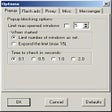
Pop Up Blocker Pro Rich Media Ads Edition
Trial version











