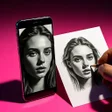
Used AR Sketching: Drawing app for Android?
Editors’ Review
AR Sketching: Drawing app, developed by Salu tech boss, helps users practice and trace artwork using augmented reality to project guides onto paper, turning a phone into an on-the-spot drawing aid. The app overlays templates, imported photos, or AI-generated outlines on a live camera feed for direct tracing and sketching, with controls for opacity, scaling, and overlay locking. Hobbyists, beginners, and casual creatives gain guided practice and quick photo-to-line-art conversion for hands-on skill building.
Turns a phone camera into a live tracing station
The app uses a live camera overlay to project semi-transparent artwork onto a physical surface, letting you trace directly from the screen. It supports three image sources:
- built-in template library
- gallery imports converted into line art
- AI text-to-sketch generated outlines
How it handles images, AI prompts, and device permissions
Image sourcing is flexible: the app converts gallery photos into simplified sketches and produces outlines from AI text prompts, so users can start from personal photos or written descriptions. The tool runs on Android and requires camera permissions for AR projection. As a focused creative utility, it is recognized as a functional tool for tracing and learning, which suits practice-oriented sessions rather than complex image editing workflows.
Who gains the most from daily sketching with this tool
Weekend sketchers and casual line-practice users find the app well suited to short exercise sessions because progress saving lets work pause and resume without losing position. Overlay locking helps keep projected guides steady while drawing, supporting cleaner line work. Adjustable opacity and scaling make it simpler to match images to different paper sizes, so repeatable practice fits into quick daily routines.
Pros
- Live camera overlay projects a semi-transparent tracing guide
- Supports gallery import and AI text-to-sketch generation
- Adjustable opacity and scaling for precise alignment
- Progress saving lets you pause and resume sketches
Cons
- AR functionality requires camera permission on Android devices
- Best alignment depends on a steady device mount
- Not aimed at advanced digital editing workflows
Bottom Line
To sum up, the app fits into short, practice-focused drawing routines
The app is a practical option for weekend sketchers and casual line-practice users who want guided hand-drawing practice rather than extensive digital editing. One consideration: alignment holds best when the device is steady, so pair sessions with a tripod or phone stand to keep the projection positioned. In short, the app integrates into short daily exercises that emphasize hands-on skill building.
Used AR Sketching: Drawing app for Android?