Used Desktop Assistant for Windows?
Editors’ Review
This browser-based dictionary tool quickly looks up words and phrases, but it may override your default browser.
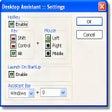
Desktop Assistant's icon resides in your system tray, where a click or a hot-key combination will quickly launch a small, unobtrusive interface dominated by a field for entering your search phrase. To find a definition, you can enter your word in the search field, or highlight an unknown word from a site or file and hit the defined hot key. From there, this tool finds your entry on The Free Dictionary site (www.thefreedictionary.com) and satisfactorily presents its definitions and synonyms.
Unfortunately, it overrode our settings for our default browser and operated only with Internet Explorer, which may not satisfy some users. There are no features other than word lookups, but it's free and easy to configure and use. All told, Desktop Assistant is handy for folks who write frequently but who don't always trust their word choices.
Used Desktop Assistant for Windows?