Used Best Free Snipping Tool for Windows?
Editors’ Review
Download.com staff
Pros
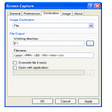
- Captures entire screen or selected parts
- Allows adding lines, arrows, and rectangles
- Saves screenshots as JPEG, BMP, or PNG
- Lightweight and easy to install
- Runs quietly in the system tray
Cons
- Lacks advanced editing features
- Limited annotation options
Used Best Free Snipping Tool for Windows?
Explore More

Sponsored
Adobe Stock
Trial version
DesignSpark Electrical (64-bit)
Free
WebAnimator
Trial version
ENTiTi AR/VR Creator
Free
PDF Decrypter Pro
Trial version
Softdiv PDF to Image Converter
Free
XnViewMP Portable (32-bit)
Free
Free GIF Collage Maker
Free
Convert PDF To Text Desktop Software
Trial versionPDF Page Resizer
Free
Multi-Batch
Trial versionPDF Compressor Server
Free