Used 90FPS with IPAD View PUBG for Android?
90FPS with IPAD View PUBG Analysis
AI Assisted Content ·
Not written by CNET Staff.
90FPS with IPAD View PUBG is a free utility application for Android that enhances the gaming experience for players of PUBG. This app is designed to help users unlock a smoother frame rate of 90 frames per second, improving overall performance during gameplay. Additionally, it provides an iPad view mode, which optimizes the game's graphics, allowing for a more immersive and visually appealing experience. The app is particularly useful for gamers looking to maximize their performance and enjoy a competitive edge in matches.
Top Recommended Alternative
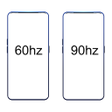
The application is user-friendly and straightforward, making it accessible for players of all skill levels. It does not require extensive technical knowledge to set up or use. The combination of increased frame rates and enhanced graphics can significantly improve gameplay, making this tool a valuable addition for dedicated PUBG enthusiasts. Overall, 90FPS with IPAD View PUBG serves as an effective utility for those aiming to elevate their gaming experience.
Used 90FPS with IPAD View PUBG for Android?