Used 3D Water Clock Live Wallpaper for Android?
Editors’ Review
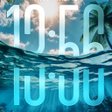
3D Water Clock Live Wallpaper, from Ringtones Pro, transforms the Android home screen into a tactile aquatic scene combining timekeeping and motion. The app renders a three-dimensional water surface that responds to touch, presents a large central clock, and fills the scene with animated fish. Built-in personalization controls adjust colors, clock styles, and fish density, making it suited to users who prefer interactive, relaxation-focused backgrounds instead of static images.
What does the wallpaper change about your home screen?
The app replaces a static background with an interactive, physics-driven scene: a simulated water surface that produces expanding ripples from touch and an animated school of fish that reacts to interaction. The design pairs a functional timepiece with ambient motion, so the home screen doubles as both a clock and a reactive visual environment rather than a plain wallpaper panel.
How much control do you get over the scene?
Personalization menus let users tune visual and behavioral parameters beyond simple color picks. Available controls include:
- multiple clock styles for the central time display
- color adjustments for water and environment elements
- fish density and behavior settings to limit or increase on-screen creatures
These options let users scale visual complexity and on-screen activity to personal taste.
Is the app resource-hungry or gentle on devices?
Animated 3D water and moving fish imply continuous rendering, so GPU work increases with higher fish counts and detailed visuals. The app is designed for modern smartphone displays that support live wallpapers, and the fish-density control serves as a built-in measure to reduce rendering load when needed. Expect higher power draw under maximum settings compared with a static background.
Is setup and daily use approachable for nontechnical users?
Installation follows the standard live-wallpaper pattern on Android, accessed through the wallpaper picker; tapping the screen produces ripples and can attract fish via the feed mechanic. The feed interaction uses a simple tap gesture, and controls are presented as adjustable options rather than scripting, so casual users can activate or dial back features without technical steps.
Pros
- Touch-triggered ripple effects use a physics-style water simulation
- Tap-to-feed fish mechanic adds engagement beyond passive wallpapers
- Per-item customization: colors, clock styles, and fish density
Cons
- High fish density increases GPU and power use on older devices
- Large central clock can obscure app icons or widgets for some layouts
Bottom Line
A focused choice for users who want a tactile, calming home screen
The wallpaper is a focused option for Android users who want a relaxation-oriented, interactive background that also displays the time. Expect increased rendering work on older hardware when you enable high fish density, but density and visual controls provide direct ways to reduce that load. The app suits anyone seeking an animated, nature-themed home screen with adjustable activity levels.
Used 3D Water Clock Live Wallpaper for Android?











