Listen to and record Internet radio, get album artwork and 1-click export to iTunes.
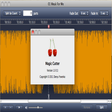
Listen to your Favorite Radio - With its high-performance database, Snowtape is able to store thousands of radio stations for you to choose from. You can search for a particular station or sort the list by e.g. genre and bandwidth. You can also add any radio station onto your favorites list to help you quickly find the right station for your current mood.Instantly Record the Program - It's as simple as clicking a button. Hit the record button while listening to your favorite station and recording starts instantly. Snowtape is able to cut the recordings at audio track boundaries automatically. Snowtape can identify potential commercials or interludes. With the built-in track editor you can cut out any interfering audio you do not wish to be exported.1-Click Export to iTunes - Simply click the "Export to iTunes" button and the audio track is encoded to high quality AAC audio and saved right into your iTunes. Album artwork and track titles are automatically exported as iTunes Audio Tags and get incorporated directly into the audio track during export.Import Internet Playlists - Snowtape can import .PLS and .M3U internet playlist files as well as .Webloc URL files. Simply drop your files onto the radio list or choose "Import Files" from the application menu. You can also provide Snowtape playlist or stream URLs. Snowtape checks every URL and only imports those that work.Drag & Drop iTunes Radio - As a bonus, Snowtape also understands items coming directly from iTunes. This means you can easily import a radio station onto Snowtape by clicking and dragging from the iTunes list. It works with any radio station you previously imported to iTunes as well as with the complete iTunes radio catalogue.Get Album Artwork - Vemedio partners with Last.fm to give you the bonus of album artwork and additional album metadata. In most cases, Snowtape can download this information automatically for you. Alternatively, a "Get Album Info" button searches and adds any album info and cover artwork available.
Had to delete 2.1 and replace it with version 2.0.9
Adrian Vogel
Pros
cannot think of any
Cons
I had to delete version 2.1 as it advertised a promo every 2 minutes or so
Summary
Works well, functional
mortte0
Pros
After initial problems with earlier versions Snowtape has become a most reliable streaming radio application. Instant playback and recording using system wide hotkeys work well.
Cons
Slightly dated interface.
Summary
Well worth considering if you're looking for this type of software.
Doesn't do what it's advertised as doing; no support.
htroberts
Pros
None that aren't trumped by the raison d'etre not functioning.
(and why don't you allow accented characters, CNET?)
Cons
I bought a license and set up a weekly recording schedule. Snowtape recorded the streaming show the first time, but not since then (it's been six weeks). New recording scheduled don't work, either.
I checked the online manual and contacted support via the vemedio.com website to see if I'd done something wrong, and after three weeks they've not responded at all.
Summary
The concept is great, and the design is decent. It just doesn't work, and the developer doesn't seem to be interested in fixing it or dealing with customers.
Save your money.
Does not work
wizardwanderer
Pros
looks nice.
Cons
Does not work, and provider won't fix it, and will notrefund my money.
Summary
It's crap!
Very one-sided selection of stations...
ms63--2008
Pros
convenient to use, easy recording...
Cons
the selection of stations only covers the western world (US & Europe), but misses nearly all Asian networks...
Summary
Compared to Radioshift Snowtape lists 1 station from Hong Kong (Radioshift 26), 0 from China (Radioshift >300) and 0 from Taiwan (Radioshift >100), only 5 from Thailand (Radioshift >200) and so on... I did not make a complete comparison, but my simple Philips Webradiobox offers by far more stations... So if you are interested in software, which covers the "world", then forget about Snowtape...
Works great, easy to use, looks good.
divendave
Pros
Great internet radio with too many stations world wide. Super easy to record music getting artwork and META info. One button transfer to iTunes. Allows you to edit before transfer to iTunes saving drive space. Just Get It.
Cons
None, even the $29 price is not bad for all that it does and for all the stations that are preprogramed and organized by categories.
Summary
If your going to buy a program to hear internet radio, record music and transfer it to an mp3 player - BUY THIS one. I set it and forget it. Keep what I like and delete the rest. This program should come with your computer. You'll love it.
Getting Better All the Time!
danomar_dotmac
Pros
Cons
Summary
This review was originally posted on VersionTracker.com.<br />This latest update dropped a few of my favorites, but they were easy enough to add again. For me, the best new feature is streaming via Airport Express. It still lacks timed recording, but as is, Snowtape is still my favorite streaming player. It has a small RAM footprint, has been very stable for me, and the quality of some streams is better than even iTunes.
Music lovers' great tool
Fariborz Amirshahi
Pros
Cons
Summary
This review was originally posted on VersionTracker.com.<br />I already own Radioshift and although it's a great program I finally bought and switched to Snowtape. The reason is that I found Snowtape's interface very nice and intuitive and its integrated recording and editing feature is second to none. It's also very fast when tunning to or switching channels and now version 1.1 adds even more funtions like importing directly 750 new stations and a more practical interface. I was skeptical at the beginning to buy this program and used it in DEMO mode for a while but now that I own it and in the light of the new enhancements I can't recommend it enough. Fariborz AMIRSHAHI - Verona (Italy)
Streams, records and downloads internet radio to iTunes
divendave
Pros
Can add your own stations, especially from iTunes radio. Easy to set and forget. Cuts songs well but if you want to edit it is simply and obvious. Export directly to iTunes with album cover and most if not all Meta data. Can search/change album cover
Cons
Doesn't always cut songs correctly, but it is easy enough to edit and import to iTunes.
Summary
Highly recommend this program. It does just two things, streams and records/edits and it does them very well. So easy to use with radio buttons for what you need.
Amazing
VersionTrackerUserOpinion
Pros
Cons
Summary
This review was originally posted on VersionTracker.com.<br />This software is really outstanding. It creates recordings of your favourite internet radio stations seamlessly. It automatically cuts songs, adds album artwork and exports it to itunes directly.
An absolute must!