Publisher's Description
From ARA:
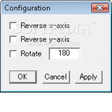
SakasaMouse is a freeware to reverse direction of mouse cursor movement in x-axis and/or y-axis. If you move mouse to the right, the mouse pointer moves to the left. This is just a joke program. You can terminate the program from system tray icon. Version 1.03 configuration dialog have been added.
More Products to Consider
- Create a media database containing all your collections.Download
Installed
Smart Install - Enhance your gameplay by editing Xbox 360 gamesaves.Download
Installed
Smart Install - Your digital bookshelf.Download
This download is served from an external site
closeNOTICE: This link will open a connection to a third-party site. CNET cannot ensure the security of software that is hosted on external sites.
Sponsored Products
Installed
Smart Install - Monitor your PC use and log keystrokes, clipboard, screenshot, ...Download
Installed
Smart Install - Meassure distances and angles on your desktop.Download
Installed
Smart Install - Drive the mosquitoes away.Download
Installed
Smart Install - Convert and resize your image files.Download
Installed
Smart Install - Receive alert notifications on natural phenomenon.Download
Installed
Smart Install - Watch weather just like the view from the window.Download
Installed
Smart Install - Design and print labels for your tapes, discs, and other disc m...Download
Installed
Smart Install - Watch as two transparent eyes follow your mouse cursor as it mo...Download
Installed
Smart Install - Manage movies, TV series, or collection of actors.Download
Installed
Smart Install - Play music using skinnable software audio player.Download
Installed
Smart Install - Print passport photo and ID photo.Download
Installed
Smart Install - Design your rooms and plan your gardens.Download
Installed
Smart Install - Make many funny but useful things for your desktop icons.Download
Installed
Smart Install - Determine a random order for a group of people or choose indivi...Download
Installed
Smart Install - Teach children addition, subtraction, multiplication, and divis...Download
Installed
Smart Install - Empower your desktop with expandable library of customizable to...Download
Installed
Smart Install - Modify your mouse settings and configurations.Download
Installed
Smart Install - View day and night images of the Earth on your desktop.Download
Installed
Smart Install - Teach children to tell time with analog and digital talking clo...Download
Installed
Smart Install - Place favorite Web links, program shortcuts, and widgets on a f...Download
Installed
Smart Install - Create realistic, 3D walk-throughs of your design ideas.Download
This download is served from an external site
closeNOTICE: This link will open a connection to a third-party site. CNET cannot ensure the security of software that is hosted on external sites.
Sponsored Products
Installed
Smart Install
-
All versions:
4.3 starsout of 3 votes
-
Current version:
4.3 starsout of 3 votes
-
My rating:
Write review
Results 1-3 of 3
-
"Very useful if your a developer of HID Trackball Mouse"
Version: SakasaMouse 1.03
Pros
Corrects the direction of the mouse movements if you have used a normal optical mouse to make a trackball mouse ! (as its upside down!!!)
Or can be used as a joke to fool people their mouse is broken :-)Cons
If you run certain Program installers Like Cnet download manager on windows 7 x64 the software stops working until you stop or finish with the installer, then normal functions return. But I'm sure this will be sorted out in future updates.
Summary
Yes this can be used a a joke!!!
But to me its a serious program that makes my Trackball mouse work...
A big thank you to the Dev. -
"Wonderful thing,but it's no shutcut."
Version: SakasaMouse 1.03
Pros
i have found it for a long time
Cons
no hotkey
sometime it's not work,but if i active it,it's all rightSummary
good thing,thanks.
-
"Game XY - No "invert Mouse" Option? Check this out!"
Version: SakasaMouse 1.03
Pros
1. It gets the job done.
2. It's free.
3. Easy to use.Cons
Doesn't do my laundry.
Summary
Some lazy developers forget to include a "invert mouse Y axis" in their games, which can be incredibly annoying when you're used to playing with inverted Y axis.
This easy to use freeware tool is the perfect solution for that problem.