Used Outside Reward GO Weather EX for Android?
Outside Reward GO Weather EX Analysis
AI Assisted Content ·
Not written by CNET Staff.
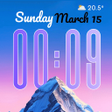
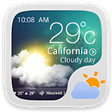
The Outside Reward GO Weather EX app is a free Android application designed to enhance the user’s weather experience. It offers a variety of themes and styles, allowing users to customize their interface according to personal preferences. The app includes features such as personalized layouts where users can modify the display of essential information like location, time, and day of the week. Additionally, users can adjust font sizes, colors, and backgrounds, creating a unique and tailored experience.
Top Recommended Alternative

To access these features, users must download the application and the latest version of GO Weather. The 'Personalized Page' tab in the main menu serves as the primary control center for customization. This functionality not only improves aesthetics but also enhances usability, making it easier for users to interact with the weather information relevant to them.
Used Outside Reward GO Weather EX for Android?
Explore More
Always On Edge - Not Only LED!
Free
3D Tech Earth Theme Launcher
Free
CRYSTAL for KLWP
PaidCyber Launcher -- Aris Hacker Theme
PaidMarshmallow - Icon Pack [Lite]
Free
Water Screen Keyboard
Free
Biohazard Samsung Edition [Substratum]
Paid![Icon of program: [Substratum] StatusBar (+…](https://images.dwncdn.net/images/t_app-icon-s/p/7fb276cc-980d-4102-ac23-aa08495e866f/132287714/2072_4-77738862-imgingest-8511573241699415400.png)
[Substratum] StatusBar (+extra) for Samsung DONATE
Paid
LockClean Substratum Mod [Oreo] FREE
Free
Theme - Galaxy S6
Free
iMessenger for android
FreeGalaxy S4 Rain
Free