Used Virtual Screen Manager for Windows?


Editors’ Review

Download.com staff
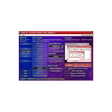
This utility enables users to manage multiple virtual screens on their desktop, enhancing multitasking and workflow efficiency with a range of advanced features.
  • Pros

    • Free alignment and resizing of the main panel
    • Customizable hot keys for quick access
    • Sticky windows for persistent visibility
    • Tooltips show screen names and contents
    • Application sharing across different screens
  • Cons

    • Integrity protection for screens
    • Handles explorer window hiding
    • Improved hanged application policy
    • Separate installer and uninstaller

Used Virtual Screen Manager for Windows?


Explore More


Full Specifications

GENERAL
Release
Latest update
Version
2.0
OPERATING SYSTEMS
Platform
Windows
Operating System
  • Windows 10
  • Windows XP
  • Windows 95
  • Windows 2000
  • Windows 98
  • Windows NT
  • Windows ME
Additional Requirements
Windows 95/98/Me/NT/2000/XP
POPULARITY
Total Downloads
27,766
Downloads Last Week
0

Report Software

Program available in other languages


Last Updated


User Reviews

4.4/5

18 User Votes


Developer’s Description

Manage several virtual screens on your desktop using this utility.
A small utility which allows to have several virtual screens on your desktop. New features are: main panel free alignment and resizing, hot keys, sticky windows, tool tips with screen names and contents, empty/nonempty screen indicating, screen integrity protection, handling explorer window hiding, help system, application sharing between different screens, improved hanged application policy, separate installer/uninstaller and some bugfixes.

Download.com
Your review for Virtual Screen Manager