Used Free Arc Calculator for Android?
Free Arc Calculator Analysis
AI Assisted Content ·
Not written by CNET Staff.
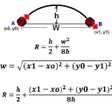
Free Arc Calculator is an Android application designed to assist users in calculating arc measurements. The application allows users to determine the radius of an arc by inputting the height and width, calculate the width by entering the height and radius, and find the height by providing the radius and width. Its straightforward functionality makes it beneficial for students and professionals alike who require quick and accurate calculations in geometry and engineering contexts.
This app features a user-friendly interface that simplifies the input process and delivers instant results. In addition to its calculation capabilities, Free Arc Calculator offers clear explanations of the mathematical processes involved, enhancing the educational value of the tool. Its accessibility as a free download further broadens its appeal, making it a practical choice for users needing reliable arc measurement solutions.
Used Free Arc Calculator for Android?
Explore More
Sesame Street
Free
Civilisations AR
Freepodo - Learn everything in Korean
FreeAleem
Free
Solved Question Papers Class 12th - Edin
Free
Introduction to Sociology Textbook MCQ Test Bank
Free
Letter, Application Writing Samples and Templates
Free
US Citizenship Test 2019 Audio Questions Citizen
Free
Hebrew Bible and New Covenant - Free
FreeQuran with Urdu Translation
FreeEzani - Takvimi, Kurani Shqip, Kibla
FreeLearn 33 Languages Free - Mondly
Free