CNET Editors' review
Bridge is not an easy game, and learning it takes some effort. While Tutorial Bridge will not teach you the game in 15 minutes, it is a great resource for users who are serious about learning and ready to devote some time to understanding how the game works.
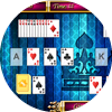
The program's interface is simple, showing the hands of the four players. Users can play on their own, or have "Charlie" help them. Charlie is an ingenious feature that provides explanations of both his own and other's actions, allowing users to learn by watching, jumping in when they feel comfortable. When users' turns comes around, at any time they can either play themselves or have Charlie do it, which is a nice way to learn. Perhaps most importantly, the program features a very detailed Help file that endeavors to teach users how the game works. There's a lot of jargon in bridge, and if we have any complaint about the Help file, it's that each bridge term is linked to a separate page with a definition. This can be helpful, but it can also lead to users getting lost in the Help file, finding definitions within definitions and not fully understanding any of it. Overall, while we think Tutorial Bridge is a useful tool, we found ourselves wishing for more instruction within the game's interface, leading players step-by-step through each part of the process instead of sending them off the Help file every time Charlie says something they don't understand.
Tutorial Bridge has a 10-day trial period. It installs and uninstalls without issues. We recommend this program to all users.
Publisher's Description
From TBridge Software:
A program for learning the game of contract bridge while at the same time playing and enjoying the game. It gives the reasoning behind each non-trivial bid that is made, or card that is played. The user can interact with the program at a rate that is consistent with his or her current knowledge of the game. The ability to undo any bid or play permits the student to compare his or her action with what the program would do in the same situation.
Hands are now displayed properly for those screen resolutions that are wider than normal.
What's new in this version: Hands are now displayed properly for those screen resolutions that are wider than normal.
More Products to Consider
- Play the latest continuation of Super Mario 3: Mario Forever.Download
Installed
Smart Install - Add new cars and new scenery to Vice City.Download
Installed
Smart Install - Get behind the wheel and own the streets from dusk til dawn.Download
Installed
Smart Install - Give Tommy Vercetti a new wardrobe with this skin pack.Download
Installed
Smart Install - Build anything you can imagine with blocks.Download
Installed
Smart Install - Guide jumping plumber past obstacles to save Mario's true love.Download
Installed
Smart Install - Try both single-player and multiplayer modes in this illicit st...Download
Installed
Smart Install - Travel, explore, make friends, and socialize, for status and we...Download
Installed
Smart Install - Play an interesting simulation game for free.Download
Installed
Smart Install - Fight for humanity against an alien onslaught.Download
Installed
Smart Install - Play an interesting samurai action game.Download
Installed
Smart Install - Play 12 solitaire card games on your PC.Download
Installed
Smart Install - Play an interesting samurai action game.Download
Installed
Smart Install - Play an interesting action game.Download
Installed
Smart Install - Optimize your PC and boost your games by one click.Download
Installed
Smart Install - Answer the quiz questions and become a millionaire like in the ...Download
Installed
Smart Install - Play an interesting paparazzi arcade game.Download
Installed
Smart Install - Play Spider Four Suits and four other spider solitaire card gam...Download
Installed
Smart Install - Confine the mouse cursor into a screen or window.Download
Installed
Smart Install - Get super prize egg for retailers, supermarkets, stores, malls,...Download
Installed
Smart Install - Sharpen your skills at Bridge with this fun and easy-to-use gam...Download
Installed
Smart Install - Participate in chess tournaments against amusing characters.Download
Installed
Smart Install - Challenge yourself with this Age of Empires sequel.Download
Installed
Smart Install - Knock out all your opponents.Download
Installed
Smart Install
-
All versions:
4.0 starsout of 2 votes
-
Current version:
3.0 starsout of 1 votes
-
My rating:
Write review
Results 1-1 of 1
-
"Would be great if "Charlie" did not make mistakes!"
Version: Tutorial Bridge 5.01
Pros
It's fun, and very informative, with explanations as the game is played as to bidding conventions, why certain cards are played, etc. The interface is very easy and user-friendly.
Cons
"Charlie", the name for the "teacher" who explains things and makes most of the bids and plays, sometimes makes flat-out mistakes that you can't undo! He plays cards that are just WRONG, and tricks are lost that could have been won.
Summary
I have been enjoying the program very much, for the most part, for reasons given above, But as also stated above, sometimes "Charlie" just makes flat-out wrong plays that even an amateur can see, and there's no way to undo and change it. Tricks are lost that could have been won--and the unplayed card that could have won the trick later goes down in another trick, so it's not just a clever (holding it till later) play that gives an aha moment. Also, on their web page there is an email address for comments, so I tried to email them, saying this--that I would have bought the program (currently in the trial period) except for this maddening flaw. My email bounced back to me immediately. So that address is no good.
This is very frustrating, as the program is otherwise quite helpful, and quite fun and addictive, and does help you learn the bidding conventions and such. But this happens often enough to be REALLY frustrating.