Used Secunia Personal Software Inspector for Windows?
Editors’ Review
Not only does Secunia Personal Software Inspector provide extensive details on the software installed on your computer, it also gives you direct links to update programs that are older and potentially not secure.
Top Recommended Alternative
The tool automatically scans your system and compares your software against a continuously updated database of thousands of applications. It identifies outdated software and lists it at the top, showing which programs are current and don’t need updates. It provides direct links for downloading updates, making it easy to get and install the latest versions. You can also set the tool to update your programs automatically. It gives a detailed view of the installed versions and their security status.
Keeping your computer secure involves more than just updating the operating system. Applications that connect to the internet, such as browsers, need regular updates to protect against new threats. Secunia Personal Software Inspector excels by finding and updating software to close security loopholes. This is crucial for maintaining your system’s integrity, especially for programs that frequently access online content.
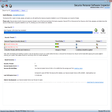
The interface mixes professional layout with a text-heavy, spartan design. At the top right of the program window, users can choose a Simple or Advanced layout. Under Simple, Secunia provides basic information about the installed program statuses, with a chart to gauge their security over time and a simplified listing of any errors. Clicking on an error leads you through the proprietary Easy-to-Patch program update process, which automatically excludes more challenging updates. The Advanced layout tab exposes more details and more updates. It also checks your Microsoft XML, your Adobe Flash player installation, and others programs, looking for mission-critical holes and their respective updates. Installed programs get flagged as Patched, End-of-Life, and Insecure, with the most recent reported threat noted with a colored bar and a mouse-over label on the right column.
Bottom Line
Scanning can be slow, and occasionally the scan restarted for a second round automatically after completing its first pass. However, the update process was seamless, and once you update a program, it moves into the Patched list after about 5 minutes, because Secunia defaults to run in the background. The End-of-Life tab offers up a toolbox with quick access to Add/Remove Programs, the listed software's folder, and online references. Secunia's plain language for instructions and explanations enhances the already robust update package, making this a highly-recommended freeware.
What’s new in version 3.0.0.11005
- This version may include unspecified updates, enhancements, or bug fixes.
Used Secunia Personal Software Inspector for Windows?
Explore More

ShutUp10
Free
TouchVPN for Windows 10
Free
ESET Smart Security Premium
Trial version
Private Secure Disk
Trial version
Keylogger Detector
Trial version
S/MIME Reader for Windows 10
Free
Trend Micro Maximum Security
Trial version
Avira Prime
PaidAudio Spy
Trial versionBetfilter
Trial version
PC Agent
Trial version
Mini Key Log
Trial version










