Used Midi Converter for Mac?


Midi Converter Analysis

AI Assisted Content ·

Not written by CNET Staff.

Midi Converter is a trial version application designed for Mac users who need to convert MIDI files into various audio formats. This software simplifies the process of transforming MIDI compositions into WAV, MP3, and other popular formats, making it easier to share and use in different multimedia projects.

Top Recommended Alternative

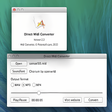
The application features a user-friendly interface that allows for quick navigation and file management. Users can easily import MIDI files, select desired output formats, and adjust settings to optimize the conversion process. With support for batch processing, Midi Converter enhances productivity by enabling multiple files to be converted simultaneously, catering to musicians and audio professionals alike.

Enlarged image for Midi Converter
Midi Converter 0/1

Used Midi Converter for Mac?


Explore More


Full Specifications

GENERAL
Release
Latest update
Version
1.0.2
OPERATING SYSTEMS
Platform
Mac
Operating System
  • Mac OS X 10.5
  • Mac OS X 10.6
  • Mac OS X
Additional Requirements
None
POPULARITY
Total Downloads
2,273
Downloads Last Week
0

Report Software

Program available in other languages


Last Updated


Developer’s Description

Converts midi files to other popular formats such as MP3.
Midi Converter for Mac is a small and simple utility designed mostly for musicians who compose music using their Macintosh computer. However, this program can be very useful for anyone who wants to convert midi music files to the far more popular and versatile MP3 format. If, for whatever reason, you don't want to use that format, then it also allows you to convert to other popular formats. However, the most innovative thing about this program and what makes it win over other programs, is that it is simply so much faster. Around 10 times faster than the other competing programs, it means that you can get the job done properly which is especially important if you are on a deadline for whatever reason. This is because it converts the files directly, rather than having to record them first as other similar programs tend to have to do. The program is very easy to use, and a trial version is also available, allowing you to try out the program for free. It also allows you to embed a player, and has a number of other features which you may find extremely useful. What's more, the program does not rely on your sound card with regards to the quality of the final output, so you can expect high and consistent quality, regardless of what sort of computer you are going to use it on.

Download.com
Your review for Midi Converter
Download.com

AI Assisted Content Disclosure

Content created and reviewed by Softonic with information obtained from PistonSoft, using AI.

CNET's editorial team was not involved in the creation of this content. Opinions, analysis and reviews were not provided by CNET.