- Quick specs
- Price: Free
- Operating system: Windows 95, Windows Me, Windows XP, Windows 2000, Windows NT, Windows 98
- Date added: September 30, 2002
- Total Downloads: 6,443
- Downloads last week: 8
- See full specifications
- CNET editors' rating: stars
- Average user rating: stars out of 3 votes
See all user reviews
CNET editors' review
Reviewed by: CNET Staff
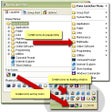
This simple application allows you to add program shortcuts to your system tray icon, although at times the program bogs down computer memory. Upon installation, Kana Launcher docks itself in your system tray while allowing the user to quickly access the program's pop-up menu. By opening the program's data folder, you can drag and drop program shortcuts to any of the three subfolders. You can create program shortcuts as floating icons, tray icons, or other menu items under the Kana Launcher's main menu. You can also create a quick-launch item to run several applications or files with user-defined time intervals. We found the program very handy, as it makes accessing frequently used programs very easy. Users also can manage program shortcuts in one place in its tabbed, easy-to-use main window. With its quick-access functionality, this freeware can be a great desktop add-on for power users.Publisher's description
From Kana Solution :Kana Launcher is a Windows program that can be used to launch any files. It can create icons associated to the files as floating windows, tray icons, or as pop-up menus. The icon management can be easily done from Windows Explorer by using the built-in functions or by drag-and-drop.
More popular Launchers downloads
- 6,892 downloads 1. LogonStudio
- 1,724 downloads 2. Switch Off
- 780 downloads 3. Free Launch Bar
- 528 downloads 4. PC Auto Shutdown
- 491 downloads 5. WinRar launcher
- See all Launchers downloads
User reviews
- Average user rating: 0 stars Not yet available
- My rating: 0 stars Write review
-
Showing 2 of 2 user reviewsSee all 2 user reviews
This software version | All versions -
Version: Kana Launcher 3 build 29
Pros: Pro: Good Concept. Tidy looking software.
Cons: Con: Non intuitive. I just missed my old Right-Click freeware which allowed me to build a powerful array of right-button options (search/find anything in anything, copy anything to anywhere, etc). Kana offered to help me build a right-button pop-up menu and, while I assme it works, it only seemed to be for uber-geeks who could decipher the cryptic operations.
-
Version: Kana Launcher 3 build 29
"very handy to clean the desktop"
Summary: This is a very good program. Popup figure is very handy.
Just two things to say it is not perfect:
-a bit of a memory hog
-popup menus appear in alphabetical order and not in user order - See all 2 user reviews Write review
Submit your review
- See more CNET content tagged:
- Kana Software Inc.,
- Microsoft Windows,
- icon