Publisher's Description
From PopuSoft:
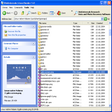
Instant File Find is a desktop search tool that lets you find files instantly on your computer. It is designed to speed up your daily work by helping you locate files instantly. With quick buttons, you can list all music or document files ( or other types) on your computer instantly. Quick buttons are customizable, so you can customize your own search toolbar. Instant File Find can sort results by size and date, helping you cleanup hard-drive easier. You can limit results by specify modified date ,size and location. Instant File Find provides a free 21-day trial of most features.
What's new in this version: Version 1.14 has fixed a crash problem and bug regarding accelerator keys.
More Popular File Management downloads
- EaseUS Partition Master Home Edition
63,296 downloads
- Easeus Data Recovery Wizard Free Edition
23,374 downloads
- TeraCopy
11,440 downloads
- Unlocker
9,551 downloads
- GoodSync
9,288 downloads
-
All versions:
4.1 starsout of 8 votes
-
Current version:
0 stars Be the first to review this product -
My rating:
Write review
Results 1-8 of 8
-
"no good after paying"
Version: Instant File Find Pro 1.13.5
Pros
worked real good as free version
Cons
so i bought full version and it hasnt worked sence
-
"So Far So Good"
Version: Instant File Find Pro 1.8.6
Pros
If it find related files fast.
Cons
It didn't find some files I had to find by myself. I may have not entered the info it needed.
Summary
I like it as much as I have used it.
-
"Incredibly useful"
Version: Instant File Find Pro 1.8.1
Pros
FAST, easy and valuable!
Cons
None that I have found
-
"Great piece of software. Best file finder I have found."
Version: Instant File Find Pro 1.4.8 build 5030
Pros
This program is a wizz at find files on your computer. When you get the paid version, once a file is found you can use all the Windows Explore on it: cut & copy, rename. You can even open the folder contain the file ti see what else is in the folder.
Cons
None. Software is excellent. I highly recommend it.
Summary
I use this product almost daily, sometimes several time a day to find files on my computer. And you can tell it where to search: anywhere from your entire computer, to thumb drives, to your C:\documents and settings\<user name>\ directory and sub directories.
If there is a file on your computer that you want to find and you have a decent idea what it's name might be, Instant File Find will find it. And it gives you plenty of search tools to work with: wild cards, search by file sizes, search by date ranges.
The Publisher has frequently updated this product and can be easily contacted for support. In the past I have sent in support requests and have gotten an answer the next day. -
"1/2 time cant find filesthats in plain sight"
Version: Instant File Find Pro 1.4.8 build 5030
Pros
i put it in two pcs and dont work right in either.why would i buy il ??
Cons
only works 1 out of 8 times
Summary
features are fine if they all worked
-
"Finds files that you can't find !!"
Version: Instant File Find Pro 1.4.8 build 5030
Pros
For such a small programme it does a fantastic job. Even as you are typing the name of the lost file, it has started looking for it, and by the time you finish typing, the answer will be there. Wild cards are supported.
Cons
I can't think of anything.
Summary
I used to be a fan of AvaFind but they haven't updated in years. File Find is well designed with a clean, straight forward interface. The results are almost instantaneous even if the file is buried under ten or more sub folders. There are several options which make this programme a pleasure to use. It is much, much faster than the Microsoft file finder and faster even than the afore mentioned AvaFind. I would suggest that File Find should be in everyone's basic toolkit - it's a must have file as far as I'm concerned.
-
"The best file/folder finder I have tried."
Version: Instant File Find Pro 1.4.2 build 4460
Pros
This software can find files/folders anywhere on your computer. It can search internal hard drives and any other storage devices such as external hard drives and thumb drives attached to your system. The support also is outstanding.
Cons
This product in not free. But it is worth every penny. In order to search. the search cache must be built. This can take several minutes. But once the cache is built, the search is instantaneous.
Summary
This is the best desktop search tool. I have found.
You can search files by size and date, by file type, and by name with or without wild card characters *", "?" or ";". And you can search your entire system or browse to select a particular section of your computer to search.
Once you find the file (or group of files) you are looking for you can copy, delete, cut and paste to another folder, and rename it.
The authors stand behind their product. I have made several support requests and have always had them answered in a few days. sometimes over night. I even suggested product changes and they incorporated one of the changes into a new product update.
I use Instant File Find every day and I find it so valuable that I have it load at windows startup.
I strongly recommend this product. Try for free. If you buy it I don't think you will be disappointed -
"I like it"
Version: Instant File Find Pro 1.3.3
Pros
Search files fast! It delivers results while you are typing!! Toolbar customization is very useful.
Cons
Should save sort option.
Add Your Review
Submit your reply
E-mail this review
Report offensive content
Previous Versions: