Publisher's Description
From Infacta:
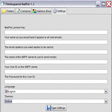
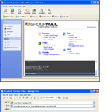
Mass email software and marketing solution takes the time and effort out of sending email newsletters, announcing new products or services to your customers or running an email marketing campaign. GroupMail puts you in full control of your email communication. It is also ideal for sending updates to customers, organizing local cummunity/sporting events or for simply staying in touch with family and friends. With highly personalized messages, GroupMail Free Edition makes communicating with large lists of recipients easy. Compose and send both HTML and Plain Text format emails, manage an unlimited number of groups and recipients and while there is a 500 recipient per send limit in the Free Edition, you can send multiple batches of 500 to get your message out to larger lists.
What's new in this version: New bookmarking feature, together with improvements to tracked URL parsing and reliability improvements.
More Products to Consider
- Send bulk e-mail messages to multiple distribution lists.Download
Installed
Smart Install - Send personalized HTML e-mails and newsletters to large mailing...Download
Installed
Smart Install - Add thousands of cool effects to webcam video for live video ch...Download
Installed
Smart Install - Send out personalized HTML messages and manage multiple mailing...Download
Installed
Smart Install - Join live-video chat rooms from around the world.Download
Installed
Smart Install - Send personalized bulk mails quickly with ease.Download
Installed
Smart Install - Chat with other people and participate in group discussions.Download
Installed
Smart Install - Send bulk Email messages from your PC.Download
Installed
Smart Install - Talk with friends and family for free over the Internet.Download
Installed
Smart Install - Add live Webcam effects to your videos and photos.Download
Installed
Smart Install - Open, view, and extract data from TNEF-encoded messages.Download
Installed
Smart Install - Add dynamic effects to your video from HD Webcams.Download
Installed
Smart Install - Create, send, and track e-mail campaigns.Download
Installed
Smart Install - Add a virtual webcam with amazing video effects to your video c...Download
Installed
Smart Install - Communicate instantly with your friends using avatars, PC-to-PC...Download
Installed
Smart Install - Preview and send personalized e-mails to contacts defined in ex...Download
Installed
Smart Install - Send personalized e-mail to large groups.Download
Installed
Smart Install - Connect your Nokia phone to PC to sync data, download software,...Download
Installed
Smart Install - Send out personalized HTML messages and manage multiple mailing...Download
Installed
Smart Install - Add a virtual Webcam for video chats software such as Skype, MS...Download
Installed
Smart Install - Send personalized group email from Microsoft Outlook.Download
Installed
Smart Install - Send individual plain text and HTML mails to a large number of ...Download
Installed
Smart Install - Chat with your friends from your desktop.Download
Installed
Smart Install - Send personalized HTML newsletters and track your campaigns wit...Download
Installed
Smart Install
-
All versions:
3.8 starsout of 65 votes
-
Current version:
0 stars Be the first to review this product -
My rating:
Write review
-
"Worked perfectly. Solved my problem."
Version: GroupMail Free Edition 5.3.0.128
Pros
I thought it was easy to set up and intuitive
Cons
None so far.
Summary
I love this product so far. I have a weekly newsletter that I send out to 2 groups of about 250 people. My email provider only lets me send an email to 25 recipients at one time. This worked great for me. My needs are fairly basic and this filled those needs perfectly.
-
"Brilliant!"
Version: GroupMail Free Edition 5.3.0.116
Pros
I'm not at all tech savvy but this was easy to set up. I had to go go online for GroupMail's SMTP configuration instructions (whatever they are) but they were easy to find, simple to follow, and worked 1st time. I don't normally sign up just to comment on these sort of things, but I thought GroupMail deserved the effort. its free after all.
Cons
None so far.
Summary
If you find downloading and configuring software a bit daunting like me, don't worry, go for it, this is OK.
-
"Kim Komando was right. GroupMail Rocks!"
Version: GroupMail Free Edition 5.3.0.112
Pros
- Sends email to large mailing lists really fast.
- You can personalize your email for each recipient.
- You can do partial sending, bulk sending and set pauses to control the speed of delivery.
- You can import recipients from practically any data source because it supports comma separated value (.csv), .txt and Windows Clipboard imports.
- You can use filters to target segments of your mailing list (i.e. Send Where [city] equals [New York], etc.)
- Easy "Resend" or "Resume" option.
- No product branding or ads in email footer.
- Includes 12 free HTML email template designs to use.
- You can import your own HTML templates that were designed externally.
- Easy, built in WYSIWYG message editor.
- Includes mailing list management tools such as merge, purge, copy, move, modify, etc.
- You can create any number of email groups/mailing lists.
- Very responsive email support.
- No annoying pop-ups or time limits normally associated with free versions.Cons
With the Free Edition, it stops sending after 100 recipients. So you either have to create multiple groups of 100 recipients or resume sending to your list after each send.
The Free Edition doesn't include the Subscriber Add-on that allows you to automatically add opt-in email addresses or remove unsubscribes or bounces from your mailing list. That feature only comes installed with the Personal and Business Editions.
Also, Free Edition users don't have access to GroupMail Forms, which is a drag-and-drop form builder. You have to be a full version customer to access that form builder service.Summary
Normally, Free versions of software are full of annoying pop-ups, have expiration periods or so lacking in features that they don't serve any real, practical purpose.
GroupMail Free Edition is very different.
GroupMail Free Edition is a fully functional, use-able version of GroupMail newsletter and email marketing software that is ideal for someone just getting started in email marketing. It will make your group email life so much easier and save you so much time! -
"Crippleware - only to 100 recipients"
Version: GroupMail Free Edition 5.2.0.88
Pros
Haven't found em yet.
Cons
Once, again, download.com does its users a disservice by failing to mention anywhere in the program description the fact that what you are obtaining for "free" will only permit emailing to 100 recipients. You don't even find this out until you have spent an hour setting the program up and importing data to create your mailing list, only to find at the last that this software will not help you.
Summary
Crippleware is not freeware.
-
"great email tool"
Version: GroupMail Free Edition 5.2.0.86
Pros
its free and works great just what i needed
Cons
was a bit of a pain on getting it to work,but once you get your head around it, on the set up your flying
-
"It does the job of sending emails to many people."
Version: GroupMail Free Edition 5.2.0.86
Pros
It is easy to use. It saves old emails and email lists.
Cons
Mailing list max is 100 email address. You have to set up multiple email groups for one real group.
Summary
It does the job. It works great sending notices to the 110 homes in our Homeowners Association without getting spammed out.
-
"I have to say it's great."
Version: GroupMail Free Edition 5.2.0.86
Pros
It worked great. I'm not a spammer, I just needed to send out about 50 personalized email notifications.
Cons
No cons at all, given it's a free program. You have to pay for the full version to get some of the flexibility; but it works as a free version very well!
Summary
I had an excel file with about 50 names/emails and individual item of data. This program made short work of individualizing and notifying those recipients with emails using my gmail account.
I entered my gmail account settings, set it up for gmail's smtp server, and imported the contacts as a tab-delimited file. Bingo, it worked flawlessly! There are even rich features to preview the messages and test the smtp setup.
Thank you for this free program! -
"Works Great! Lots of features"
Version: GroupMail Free Edition 5.2.0.85
Pros
Worked perfectly on first try! Did exactly what I wanted - sent a personalized email, using an imported tab delimited contact list. Lots of features - rich text/html email, import contact lists, schedule delivery, exclude contacts, etc! FREE!
Cons
There are tons of options, which could be confusing to beginners. There are options for surveys and email statistics, but when I clicked the link to learn more, I got a 404 error page.
Summary
Works great and has lots of sophisticated features! But, this program may be too difficult for the average email user. Truly free program. Thanks for providing it!
-
"By Far The Very BEST!!!"
Version: GroupMail Free Edition 5.2.080
Pros
Unlimited Lists,
Unlimited Subscribers
FREE-Version
Capable of merging address books from Outlook, etc. in a matter of SECONDS, I couldn't believe it.
Can Import AND export recipients from excel, etc. all for FREE
Very easy to navigate.Cons
Once I set the group up, and started adding recipients, I later wanted to change the field but couldn't figure out how to add more field options to the existing group. Other than that, I give it 5 stars.
Summary
This is something that you definitely want to try. You will be doing YOURSELF a great favor if you try this application. Prepare for great miracles. Don't waste your time downloading other applications like I did. I downloaded a bunch of applications and they ALL were pretty much a waste of time. However, this application totally blew me away. I am so glad I found it. I was dancing around all morning, praising God. (God is Jesus' daddy and my big brother)
Advanced version is very affordable but the FREE version does exactly what I needed it too. -
"A good product, but NOT free!!"
Version: GroupMail Free Edition 5.2.076
Pros
The program works well, is easy to use, and does what it's supposed to do.
Cons
Don't be fooled by that "free" label! this is a very limited demo version and you will quickly run into barriers. the upgrade is expensive.
Summary
The features of this program are that it prepares email lists, helps you to put your newsletter together, then sends it out successfully. It is easy to use (unlike many of the competitors) and works well. But the capacity is limited, and the ability to import names is partially disabled. The upgrades start at $140, so don't get too attached to the free version!