
Used Day Maxi Calc for Windows?
Editors’ Review
Day Maxi Calc is a basic calculator application that gives users a few extra features in addition to the usual calculator functions. Unfortunately, the extras that come with this calculator aren't really enough to make it worth bothering with.
The publisher's description of this program boasts that it's a "supersized calculator with big buttons and a wide display," and it's true--sort of. The interface is fairly large, as are some of the buttons, including the operator buttons. Strangely, however, the number buttons aren't much bigger than those on the standard Windows calculator. The interface offers a space to view previous work, much like with a desktop printing calculator. We like that Day Maxi Calc lets you both save and print your work. At least, that's how it's supposed to work; although it was easy enough to print, we had no idea how to save. Sure, the program has a space for you to enter a file name, as well as a Save button, but where is this mysterious file actually saved to? We have no idea. This is exactly the sort of thing we'd look up in the Help file, if there was one. Overall, while it seems that Day Maxi Calc made an effort to improve over the standard calculator, we can't say it succeeded.
Day Maxi Calc is free. The program installs and uninstalls without issues.
What’s new in version 1.5
Used Day Maxi Calc for Windows?
Explore More

Measurement Convertor
Free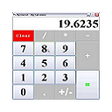
Maths Calculator
Trial version
Numerical for Windows 8
Paid
Quick Calculator
Free
Refinance Calculator
Free
ESBUnitConv Portable
Free
Equation Calculator for Windows 8
Paid
MultiCalculator
Free
GFRC Calculator
Free
Ultimate Measurement Converter
Trial version
Calculator2 for Windows 8
FreeSolar Calculator
Free











