CNET Editors' review
No need to rely on an abacus or fingers and toes once you have this free Calculator for Science Students in your toolbox. A variety of calculators, converters, references, and glossaries reside at your fingertips through this full-featured app.
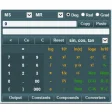
This calculator launches a nicely designed, easy-to-use interface--slightly drab, but easy to comprehend. It offers a numeric keypad and buttons for performing a number of scientific calculations. Below the keypad are six tabs that provide access to a wide series of tools that will make a handy reference for science students and teachers. This application performed quickly and very well in our tests. We were very pleased with the number of tools and references it made available. (Semi-fuddy-duddies will be happy to see a list of metric prefixes you can never remember, and the conversion tools will help in translating U.S. measures to European--along with linear acceleration and angular acceleration for hip physicists and amateur astronomers.) Only a few tools require purchasing the fully registered version of the app (unfortunately, the quadratic calculator is one of them), and in all cases the price is very affordable.
Home schoolers will really appreciate this download--it's like a compact mathematics desk reference on your hard drive--but we recommend it for all users.
Publisher's Description
From Dot Point Learning Systems:
This is an easy to use Scientific Calculator with a high level of functionality. It incorporates many science tools including a triangle calculator, vector calculator, shape calculator, kinematic calculator, half-life calculator, maths calculator, gas laws calculator, statistical calculator, percent and proportion calculator, world times, event timer, measurement converter and a molar mass calculator. Numerous science data reference systems can be called including SI units, symbols, constants, maths laws, atomic structures, organic compounds, ions and ionic compounds, and chemical reactions. Over 500 commonly used compounds can be quickly called to list their name, formula, molecular mass and CAS number. Over 100 constants can be called to list their numerical value and uncertainty value. Search systems are available for science symbols, ions, science terms and equation formula. Interactive flowcharts can be called for mechanical and electrical units. An interactive periodic table lists elements properties. A help system explains operation, and system contents can be quickly located through a search system.
What's new in this version: Many enhancements and additions made.
More Products to Consider
- Hear the Athan (Azan) automatically five times a day at each pr...Download
Installed
Smart Install - Look up words in thesaurus and dictionary from almost any progr...Download
Installed
Smart Install - View your real-time physical position on moving Google Map.Download
Installed
Smart Install - View satellite pictures, maps, terrain, buildings and other glo...Download
Installed
Smart Install - Display subliminal messages on your desktop.Download
Installed
Smart Install - Get reminders about prayer time.Download
Installed
Smart Install - Discover how to type and improve your typing.Download
Installed
Smart Install - Get table data in every files of science.Download
Installed
Smart Install - Make calculations using scientific calculator with a paper trai...Download
Installed
Smart Install - Instantly compute the result as you type math expressions.Download
Installed
Smart Install - Read King James Bible on your PC.Download
Installed
Smart Install - Get ready access to numerous reference tables, calculators and ...Download
Installed
Smart Install - View, read, and convert EPub eBooks.Download
Installed
Smart Install - Get English and Sinhala definitions with technical terms glossa...Download
Installed
Smart Install - Turn your computer to an interactive physics laboratory.Download
Installed
Smart Install - Learn chemistry with this periodic table, database of the eleme...Download
Installed
Smart Install - Learn touch-typing with a program that dynamically adjusts trai...Download
Installed
Smart Install - Get an English too Bangla dictionary.Download
Installed
Smart Install - Read and Listen the Quran in many languages, with famous recite...Download
Installed
Smart Install - Dispense with your handheld graphing calculator.Download
Installed
Smart Install - Read ebooks on your Windows personal computer.Download
Installed
Smart Install - Exercise your typing fingers with practice lessons and entertai...Download
Installed
Smart Install - Calculate your profit, loss, and share price when buying or sel...Download
Installed
Smart Install - Education and science documents processor.Download
This download is served from an external site
closeNOTICE: This link will open a connection to a third-party site. CNET cannot ensure the security of software that is hosted on external sites.
Sponsored Products
Installed
Smart Install
-
All versions:
4.0 starsout of 7 votes
-
Current version:
0 stars Be the first to review this product -
My rating:
Write review
Results 1-7 of 7
-
"Nice piece of software."
Version: DPLS Scientific Calculator 3.2
Pros
It has more functions than basic calculators.
Cons
None that I can see in the software
Summary
I recommend this software to anyone.
-
"Amazing Calculator!!"
Version: DPLS Scientific Calculator 3.1
Pros
Easy to use, powerful and very inexpensive
Cons
Need more functions ... LOL Just kidding!!
Summary
Great calculator for all kinds of math and science problems.
-
"blocked as suspicious behavior"
Version: DPLS Scientific Calculator 3.0
Pros
the '.exe' file was blocked by Norton 360 as acting suspiciously after which I deleted the file
Cons
malware problem
Summary
Blocked by security software
-
"It's very Good"
Version: DPLS Scientific Calculator 3.0
Pros
It's very Good
Cons
None observed yet
Summary
Works well
-
"Awesome Caculator!"
Version: DPLS Scientific Calculator 2.1
Pros
Just about every constant, measurement, and conversion factor is supplied!
Cons
None that I could see so far.
Summary
Truly amazing at the amount of information provided with this calculator!!
-
"Very good calculator"
Version: DPLS Scientific Calculator 2.0
Pros
Very easy to use and loots of stuff in it.
Cons
Not much. Simple and usefull
Summary
Very easy to use and lots of tools.
-
"Best calculator I've seen on the web"
Version: DPLS Scientific Calculator 1.5
Pros
Nice user interface. Equation calculators are simple to use. Good measurement converter.
Cons
Takes up some room on the screen.
Summary
Very good calculator. Recommended