ie8 fix
Click Here

Corel PhotoImpact

CNET Editors' review

by: CNET Staff on November 08, 2008

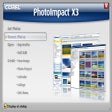
Perhaps a touch less powerful than the most elaborate photo-editing packages, Corel has expanded Ulead's PhotoImpact and blown it up. The download file is nearly double the size of the last version, but PhotoImpact X3 makes a concerted effort to compete with Adobe. Positioned between Elements and Photoshop, this app delivers everything most users need: editing tools, effects, and ready-made elements for creations.

The wide variety of textures, frames, effects, animations, and brushes wouldn't necessarily justify the download, but the app is more or less a snap to use. Wizard dialogs let you instantly create attractive and functional Web-page objects, including buttons, image maps, bullets, and backgrounds. The program works with layers, too. The traditional photo-editing interface has only one peculiarity: the main docked panel, which can hold all the other panels and quickly hide and show them. It also lets you quickly switch among work-space layouts. Beginners, for instance, can display just the controls for basic editing.

All in all, this powerful graphics program will appeal to photographers and Web designers who need a significantly cheaper alternative to monster packages such as Photoshop.

 
Back up and synchronize your important files automatically.

Publisher's Description

From Corel:

Corel PhotoImpact X3 combines full-featured photo editing with inspiring photo projects and amazing digital art to make digital photography and image creativity fun, fast and easy. Easy & Fast ExpressFix Mode: Automated enhancements and easy-to-understand options put the tools you need at your fingertips. Instantly fix exposure, color, and composition. Beginners like the simplicity, experienced users like the efficiency. Take Your Photos to New Places Use easy wizards to create fun photo projects and gifts. Choose from over 200 customizable templates for a wide range of ways to share your pictures. Collages Comic strips Calendars Greeting cards Create Amazing Digital Art: Paint realistic looking clouds with the cloud pen, Enhance your photos with creative filters, and draw and paint like a pro.

Version X3 includes Corel Painter Essentials 3 Full Version, Slideshow Prep Wizard, and new crop tools.

What's new in this version: Version X3 includes Corel Painter Essentials 3 Full Version, Slideshow Prep Wizard, and new crop tools.

More Popular Image Editing Software downloads

  1. PhotoScape

    163,534 downloads

  2. IrfanView

    107,406 downloads

  3. Adobe Photoshop Extended

    34,007 downloads

  4. FastStone Image Viewer

    30,063 downloads

  5. PhotoShine

    14,613 downloads

 
Bring people, information & business approaches together
All User Reviews
  • All versions:

    3.5 stars

    out of 131 votes

    • 5 star: 52
    • 4 star: 26
    • 3 star: 16
    • 2 star: 9
    • 1 star: 28
  • Current version:

    3.3 stars

    out of 62 votes

    • 5 star: 21
    • 4 star: 14
    • 3 star: 7
    • 2 star: 4
    • 1 star: 16
  • My rating:

    0 stars

    Write review

Results 1-10 of 54

  • 4.0 stars

    "Easy to use"

    November 16, 2011  |   By FairyMuch

    Version: Corel PhotoImpact X3

    Pros

    Simple easy to understand even for kids!

    Cons

    You have to click double when Save as is in use till you get nameimage.ufo or when you need another of the same image again nameimage.gif click till the .gif is showing after the name. Otherwise it doesn't work and it will leave a blanc on the filetype. To correct it open with Ulead Photoimapct again and do the steps Save as nameimage.(filetype you need)over!

    Summary

    I use it for several years now and you don't have to take classes for it ;-)

    Reply to this review

    Was this review helpful? (0) (0)

  • 4.0 stars

    "works well"

    May 22, 2011  |   By featherfletcher

    Version: Corel PhotoImpact X3

    Pros

    intuitative operation,

    Cons

    networking

    Summary

    good product to have for photo needs

    Reply to this review

    Was this review helpful? (0) (0)

  • 4.0 stars

    "Simple but rich image editor"

    May 7, 2011  |   By Richardau01

    Version: Corel PhotoImpact X3

    Pros

    Very similar to previous versions
    Works

    Cons

    None I can find so far

    Summary

    Easy to use app, much simpler than Photoshop,

    Reply to this review

    Was this review helpful? (0) (0)

  • 1.0 stars

    "Limited in the file types it supports."

    April 19, 2011  |   By rogerkremske

    Version: Corel PhotoImpact X3

    Pros

    Lots of automated fixes.

    Cons

    It does not support any raw fikes other thah DNG. Also will not load TIF fikes if they're layered.

    Summary

    Sorry, but i have no desire to convert my library of raw files nor am I willing to convert my TIF file to something else like PNG or JPG. I tried to do that and i lost the layering in the TIFs and all the meta data when I converted the TIFs. It just wasn't for me. Fortunately Corel refunded the purchase price with no hassle, and refunded quickly.

    Reply to this review

    Was this review helpful? (0) (0)

  • 4.0 stars

    "I use it for all my websites I create and photo editing"

    March 20, 2011  |   By diesoutie1

    Version: Corel PhotoImpact X3

    Pros

    Photo Compression

    Cons

    It is not free software

    Reply to this review

    Was this review helpful? (0) (0)

  • 2.0 stars

    "worst photoimpact ever"

    March 11, 2011  |   By ronbat

    Version: Corel PhotoImpact X3

    Pros

    started with ver 6, upgraded to xl, they were easy and fast to learn,great gui, after downloading trial ver x3 i saw many improvements

    Cons

    after 1st day it locked up, loads too slow, many features will stop working and you have to reboot, there download system would not let registered user's download another copy

    Summary

    not same quality of older versions when ULEAD was there own company

    Reply to this review

    Was this review helpful? (0) (0)

  • 3.0 stars

    "Great program but..."

    February 4, 2011  |   By okdawn

    Version: Corel PhotoImpact X3

    Pros

    The program is intuitive, easily mastered without tutorials. Good for beginners... way easier to understand then Adobe Illustrator.

    Cons

    Customer support, memory hog (but most Design softwares are)

    Summary

    The problem is Corel... they don't support any product that isn't Corel. Don't expect any decent customer service and this program is being discontinued says 'Kris' from Corel customer service (2/4/11). It won't run on Windows 7 and they are not going to make any patches. Corel bought ULead and has planned on phasing out the PhotoImpact software.

    Reply to this review

    Was this review helpful? (0) (0)

  • 5.0 stars

    "great software! easy to download too!"

    February 4, 2011  |   By luisrebullida

    Version: Corel PhotoImpact X3

    Pros

    User friendly. Fun to use too!

    Cons

    a little more memory consumption compared to other software. but its worth the s.pace

    Reply to this review

    Was this review helpful? (0) (0)

  • 4.0 stars

    "It's pretty fair at what it does"

    January 19, 2011  |   By thomson160

    Version: Corel PhotoImpact X3

    Pros

    ease of use is important to me as an older user, this seems to me to be O.K. but I may have missed something !

    Cons

    The constant demands for review are annoying, people who download, are meaning to try the product "in the near future", not that day. So I, for one, wished that they would wait until I have had a fuller look, and not ask me for a review, until then.

    Summary

    I like the idea of being able to access this program, and given a little time might try some more of this type, when I get a bit more acqauinted with graphics and photo manipulation skills.

    Reply to this review

    Was this review helpful? (0) (0)

  • 5.0 stars

    "Legendary software deserves better support from Corel"

    January 9, 2011  |   By trancegroup

    Version: Corel PhotoImpact X3

    Pros

    Ultra intuitive, friendly, great features and superb effects, easy manipulation and one of a kind filter integrations, fast to complete intermediate jobs

    Cons

    Used to be in better hands with Ulead support, tools just miss the mark compared to photoshop elegance or Magix Graphics Designer smoothness. Eats memory and drains CPU on advanced renders. Not fit for publishing, no vector development

    Summary

    I have been a super loyal fan of PhotoImpact since PhotoImpact 3. It is easy to learn, and gets excellent results editing photos. It is a brilliant texture creating and bitmap art application with a full set of effects to distort and add futuristic textures as well as animate. Its blend filters are better than any other drawing software.

    There are flaws with memory and cpu use and the tools lack the refinement of Photoshop or Magix Graphics Designer.

    For photographers, web artists and designers and intermediate to advanced graphics this is the ultimate tool to have in your arsenal. The web page utilities include auto and manual slicing, graphics optimization, html text and flash movie insertion, plus a huge assortment of great templates for buttons, icons, borders, objects, headers, thirds and banners.

    I hope Corel decides to revamp the Photoimpact code and develop the next generation of this classic software. I am sure I speak for the thousands of Photoimpact fans who are searching for the next, new and improved build.
    Chris Mar

    Reply to this review

    Was this review helpful? (0) (0)

Results 1-10 of 54

Add Your Review

or Log in or create an account to post a review.
You are logged in as . Please submit your review for Corel PhotoImpact X3
Add Your Review

The posting of advertisements, profanity, or personal attacks is prohibited.
Click here to review our site terms of use.

Submit your reply

Submit

The posting of advertisements, profanity, or personal attacks is prohibited.
Click here to review our site terms of use.

cancel

E-mail this review

Submit cancel

Report offensive content

If you believe this comment is offensive or violates the CNET's Site Terms of Use, you can report it below (this will not automatically remove the comment). Once reported, our staff will be notified and the comment will be reviewed.

Select type of offense:

Offensive: Sexually explicit or offensive language
Spam: Advertisements or commercial links
Disruptive posting: Flaming or offending other users
Illegal activities: Promote cracked software, or other illegal content
Submit cancel

See more CNET content tagged:

Previous Versions:

Click Here

Error

close

ERROR MESSAGE

If you think this is an error, please contact CNET TechTracker Support for further assistance.

Ok

Running Request

close

loading

Smart Install Software

close

CNET TechTracker will now automatically install software without requiring further action by you. (Note: This feature automatically accepts associated EULAs and third party applications on your behalf.)

You have selected the following software to Smart Install:

CNET TechTracker will attempt to install this software without interrupting you again. If an application requires manual installation, CNET TechTracker will download the installer and prompt you to take further action.

Proceed with Smart Install?

Confirm Standard Install Cancel

Submit a problem report for Corel PhotoImpact

close

Please describe the problem you have with this software. This information will be sent to our editors for review.

Problem:

The CNET Installer isn't working as expected

The download link does not work

The software has a newer version

The software contains malware

Other

Description:

Please select a feedback type.

Please enter a description.

Submit Problem Report

Problem Report submitted

close

Thank you for submitting a problem report! The Download team is committed to providing you with accurate software information.

OK