
gBurner para Windows
- Por gBurner Systems
- Versión de prueba
- Calificación del usuario
¿Has usado gBurner para Windows?
Revisión de los editores
gBurner es una aplicación multimedia diseñada para Windows que se especializa en la grabación de CD. Este software de versión de prueba proporciona a los usuarios características esenciales como la creación de discos, la copia de seguridad de datos y la compilación de CD de audio. La interfaz es fácil de usar, permitiendo tanto a usuarios novatos como experimentados navegar por sus funcionalidades con facilidad. Soporta varios formatos de disco, incluyendo CD-R, CD-RW, DVD-R y DVD-RW, lo que lo hace versátil para diferentes tareas de grabación.
Alternativa más recomendada

Además de las capacidades de grabación estándar, gBurner incluye funciones para crear imágenes ISO y gestionar imágenes de disco. Los usuarios también pueden editar el contenido de discos existentes y realizar copias de disco a disco de manera eficiente. gBurner es particularmente útil para aquellos que necesitan hacer copias de seguridad de datos o crear compilaciones de audio, con un enfoque en la velocidad y la fiabilidad. En general, ofrece un conjunto completo de herramientas para cualquiera que busque gestionar sus necesidades de grabación de CD y DVD en una plataforma Windows.
gBurner para Windows
- Por gBurner Systems
- Versión de prueba
- Calificación del usuario
¿Has usado gBurner para Windows?
Explorar más

Patrocinado
Adobe Photoshop
De pago
iPod Copier
GratuitoRM Audio Converter
Versión de prueba
Xilisoft Audio Converter Pro
Versión de prueba
Movie Burner Solution
Versión de prueba
M4A MP3 Converter
Versión de prueba
CBurner
Gratuito
Dragon
Gratuito
FinalBurner Free
Gratuito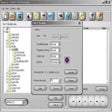
DART CD-Recorder
Versión de pruebaSurfSecret CD Rip & Burn
Versión de prueba
Ashampoo Burning Studio 2024
Gratuito











